


Incident management tools play a central role in restoring service quickly, coordinating teams clearly and giving organisations the visibility they need to improve over time. The best tools do not replace process discipline, but they do make it much easier to route work correctly, manage urgency, communicate clearly and learn from disruption.
Why Incident Tools Are Important
The job of incident tooling is to enable the entire incident life cycle, from detection, triage, resolution, review and improvement. In other words, to ensure that people and teams are able to identify the incident more quickly, assign it appropriately, handle the priority in a consistent manner, inform stakeholders and capture the correct information for future incident prevention efforts.
Tooling is also used for modern service teams to standardise execution. With workflows, escalations, dashboards and communications integrated into the operating model, teams will be less reliant upon individual heroics and will be able to provide repeatable high-quality responses when they are being tested.
Detection and logging
Tools can be used at the beginning of the lifecycle to consistently capture incidents, and direct them to the appropriate queue, team or group of resolvers. They also enhance visibility by streamlining the intake process for signals from service desks, users, monitoring platforms, and self-service channels.
Triage and prioritisation
Good tooling should be used to support logging of an incident, classification, prioritisation and escalation. It’s particularly significant during major incident situations, where teams must adhere to distinct workflows, speedy rules for assigning and communicating tasks, and avoid confusion and duplicated effort.
Investigation and collaboration
Incident tools should facilitate the assembly of analysts, technical specialists, on-call teams and service owners during resolution. This involves viewing shared notes, seeing timelines, connecting records, collaboration channels, and quick access to knowledge articles or past fixes.
Communication and control
Communication is as critical to incident management as technical resolution. Tooling should enable the ability to have service updates, notification to stakeholders, internal handoffs and communicate with external parties to give the organisation a voice rather than no voice.
Review and improvement
Following the resolution, tools should facilitate post incident review, trend analysis and issue follow-up. The purpose of postmortem, root cause records/reports is not only to get the service back up and running, but to minimise the likelihood and severity of reoccurrence.
The following are some of the core skills to seek out:
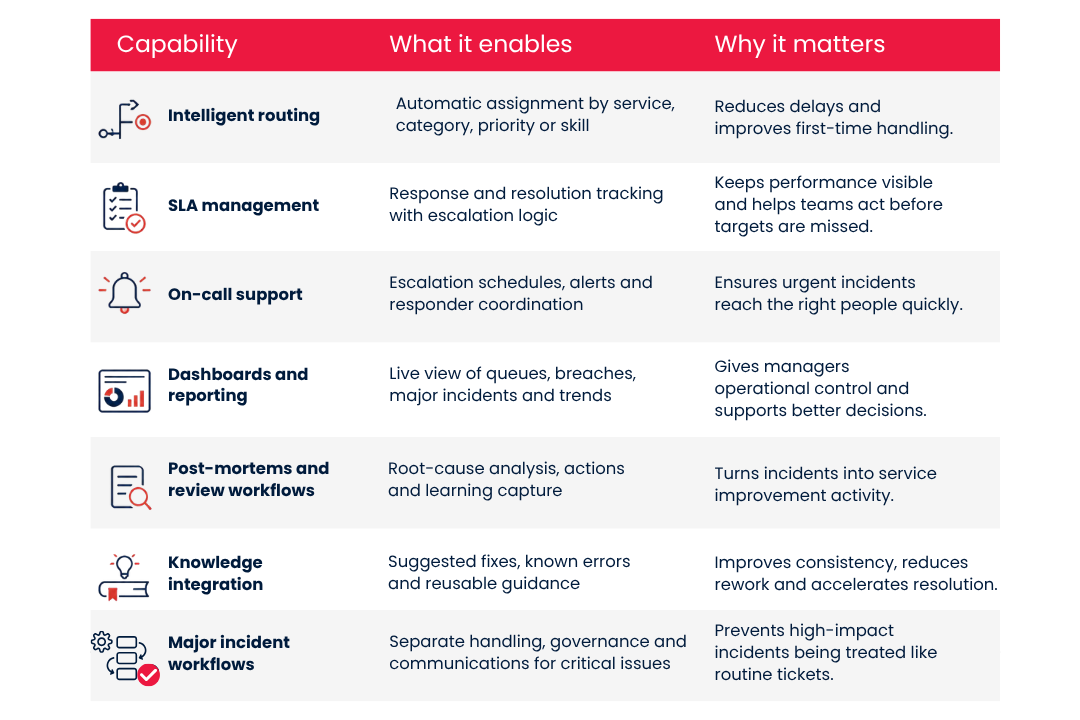
These are the most important when they are set up to enable real operating practices. Even with a feature-rich platform, inconsistent content will still be produced due to weak workflows, unclear/work poorly governed ownership.
Integrations Which Support Incident Management
Incident tools are not likely to succeed on their own. Their value is enhanced when they are connected with the broader service management and operations landscape.
Monitoring and observability
Monitoring integrations can aid teams identify problems sooner and minimise manual logging. They also enable the creation of links between technical alerts and service records, enhancing the triage, correlation and incident timelines.
Having a forum for discussion and communication.
Integrations for chat and collaboration make it easier to coordinate your team in real time, particularly during large incidents. They work best when they are a part of the structured incident record and not a side channel that is not tracked.
Status pages and service communication
Status page integrations are useful because they help communicate with users and minimise unnecessary contact during live incidents. They’re not the same as internal dashboards: status pages are aimed at visibility across all stakeholders, while dashboards facilitate operational control.
Migrate to knowledge, CMDB and change records
Context and speed are enhanced with connections to knowledge bases, configuration data and change history. They assist teams to determine if an incident is associated to a recent change, a dependency that is known or a workaround that is already in place.
How To Assess Incident Management Tools
The selection of the tools should begin with the needs of the services, not product demos. In its advice on tool selection and service assessment, SDI highlights the need to match tools with process maturity, reporting requirements, customer benefits and practical operational needs.
Some of the helpful evaluation criteria are:
✅ Install existing incident, major incident and escalation workflows.
✅ Analyst, Manager & Resolver Team ease of use.
✅ Flexibility of prioritisation, routing and SLA logic.
✅ Reporting quality, clarity of dashboards, and exportability.
✅ Integration strength between monitoring, chat, CMDB, status pages and knowledge.
✅ Support for post incident reviews and continual improvement.
✅ Scalability in IT and wider enterprise service environment.
✅ Vendor support, implementation effort and total cost of ownership.
Real workflow testing should be part of a practical selection process, rather than feature comparison. The purpose of this is to shortlist the tools and then evaluate them against these real-life scenarios: Major Incident, SLA Breach, Repeat issue with a need for problem management, and Cross-team communication event.
Incident Metrics That Matter
The most useful metrics are those which indicate operational performance and service quality. Focused speed dashboards can mask poor communication, repeat failure, and unnecessary demand.
Some of the metrics that should be monitored are:
- Time to be recognised, time to make service better.
- SLA achievement and event of SLA violation.
- Major incidents and trends on a time series basis.
- Re-opened incidents & repeat incidents.
- Tickets that are pending resolution and in ‘ageing backlog’.
- Timeliness of communication during high-impact incidents.
- Completion of autopsies and follow-through on action.
- Customer response time and customer service perception when incidents occur.
The strongest teams are those that add improvement metrics to their operational ones. The University of Portsmouth case study demonstrates the benefits of introducing a standards-based approach to the team to take a more focused approach to the metrics they are measuring and to see a marked reduction in customer response times.
Common Tooling Anti-Patterns
Even though the platform may be capable, there are several common errors that lead to a decrease in value of incident tooling.
- Making the tool the process, not designing them first.
- Application of the same workflow for all incidents – major incidents included.
- Only measuring closure speed and not considering repeats incidents, experience and quality.
- Let chat tools be the actual record of the incident rather than use the platform as the record.
- Giving too many customisations to fields and forms which slow it down, confuse it or make it difficult to govern.
- Failure to relate incident action to problem, knowledge and change improvement actions.
Typically, these anti-patterns occur when tools are selected too quickly, or when the service function is implemented instead of the service outcomes. This leads to a platform that’s often too busy, too costly and not used to its full potential, but not strong enough to support the moments that truly count.
What Good Looks Like
The incident management should benefit from a robust incident management tool that can help a service work team respond rapidly, communicate clearly and improve systematically. It should be robust enough to cover the entire lifecycle, be seamlessly connected to the wider environment, and generate information that leaders can trust and use to make decisions.
Generally, the tool with the most extensive feature set is not the best option. It is the one that enhances your incident process, team capability, reporting requirements and levels of service maturity, and is the easiest to learn from disruption and deliver a better experience next time.