




Selecting an ITSM platform is a major step, but it is not where value is realised. The real return comes from implementing the tool well, aligning it with service needs and making sure the organisation is ready to adopt and manage it effectively. That is why having a clear implementation project plan matters.
A good implementation plan creates structure from the beginning. It helps teams clarify ownership, control scope, manage risk and move towards go-live with greater confidence. It also bridges tool selection and long-term service improvement. SDI’s ITSM Tool Selection & Assurance Services reflect this end-to-end view by supporting organisations not only in choosing a tool, but also in configuring, governing, and optimising it over time.
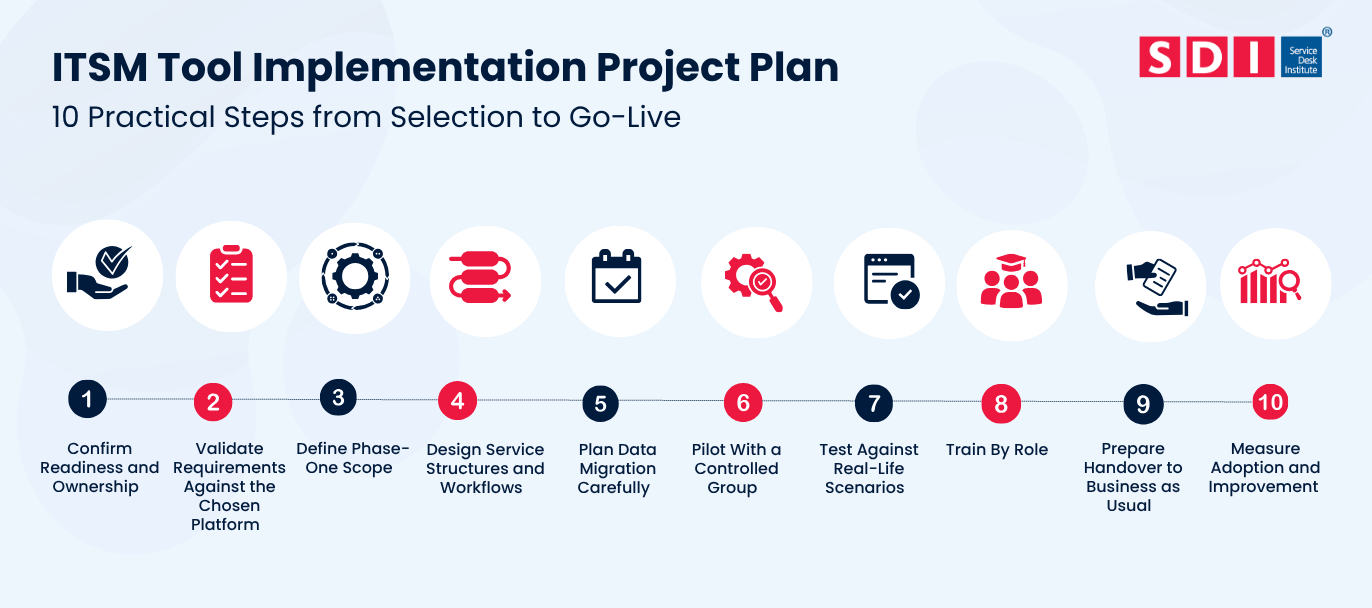
Here are the 10 practical steps to help you select and implement the right ITSM tool:
- Confirm Readiness and Ownership
- Validate Requirements Against the Chosen Platform
- Define Phase-One Scope
- Design Service Structures and Workflows
- Plan Data Migration Carefully
- Pilot With a Controlled Group
- Test Against Real-Life Scenarios
- Train By Role
- Prepare Handover to Business as Usual
- Measure Adoption and Improvement
Step 1: Confirm Readiness and Ownership
Ownership is the first step in any successful implementation. This includes the executive sponsor, service desk manager, process owners, platform administrator, and any business stakeholders who need to influence design or adoption.
At this first stage, it is very important to define what success looks like. That may include improved responsiveness, more consistent service delivery, greater adoption of self-service, or stronger reporting.
Step 2: Validate Requirements Against the Chosen Platform
Requirements captured during selection should be reviewed again once the implementation begins. This is the point where the organisation confirms what can be delivered out of the box, what needs configuration and what should be deferred to a later phase.
This step should also connect back to the original selection rationale. SDI’s A Comprehensive Guide to ITSM Tool Selection is a useful supporting resource because it helps maintain continuity between the selection decision and the implementation approach.
Step 3: Define Phase-One Scope
The first release should focus on the abilities that will add the earliest value. In many organisations, this implies incident management, the processing of requests, access to portals, and the management of SLAs before more advanced workflows are implemented.
Adopting all the processes at once can slow the project and make it riskier to implement them.
Step 4: Design Service Structures and Workflows
This next stage covers the practical foundations of the new platform, including ticket categories, priorities, service catalogue items, request forms, routing rules, notifications and reports.
It is also the best point to simplify complexity. Instead of reproducing every historical process exactly as it was, organisations should look for opportunities to standardise and streamline where appropriate.
Step 5: Plan Data Migration Carefully
Migration should be selective. Teams should determine what stays on the new platform and what can be moved to the archive, and what is no longer valuable.
Normal areas include:
- User and support group data.
- Open and recent tickets.
- Knowledge articles.
- Service catalogue content.
- Asset and CMDB records where relevant.
- Reporting history needed for continuity.
Step 6: Pilot With a Controlled Group
Once you have the migration plan ready, the next step is to test with a small group.
Staffing is handled by a pilot, which helps test the platform before it is opened to all users. It can help teams review their workflows, collect user feedback, and identify problems before they escalate.
This may be within one Department, one site, or one support function in the organisation, depending on the organisation’s size and structure.
Step 7: Test Against Real-Life Scenarios
Testing should reflect the real service environment rather than generic acceptance steps. That means using genuine request paths, realistic escalation rules, actual SLA calculations and live support situations.
This is particularly important for portal journeys, automation flows and integrations with surrounding systems.
Step 8: Train By Role
Different groups need different types of enablement. Analysts need operational confidence, managers need reporting visibility, admins need configuration knowledge and end users need simple guidance on how to interact with the new service.
Training should not be treated as a single generic session. It should be relevant, role-based and timed so that people can apply what they learn. Additional tool and service improvement resources can be found through SDI’s Tools & Technology hub.
Step 9: Prepare Handover to Business as Usual
Before go-live, the organisation should document who owns administration, who handles enhancement requests, how governance will work and how future changes will be controlled.
A good handover reduces the risk that the platform will stagnate once the project team steps back.
Step 10: Measure Adoption and Improvement
Go-live is not the finish line. Once the platform is live, the organisation should review whether it is being used effectively, whether service performance is improving and where processes can be further refined.
Some of the useful review areas include portal adoption, ticket-handling consistency, SLA performance, knowledge usage, and user feedback. This is where longer-term optimisation support can become especially valuable, and where SDI’s ITSM Tool Selection & Assurance Services provide a natural next step.
Continue Your Research
So, if you are planning an ITSM implementation, these SDI resources are useful next steps:
➡️ Read A Comprehensive Guide to ITSM Tool Selection