



 Back to Resources
By Alex Harding, Head of IT Services, Runshaw College
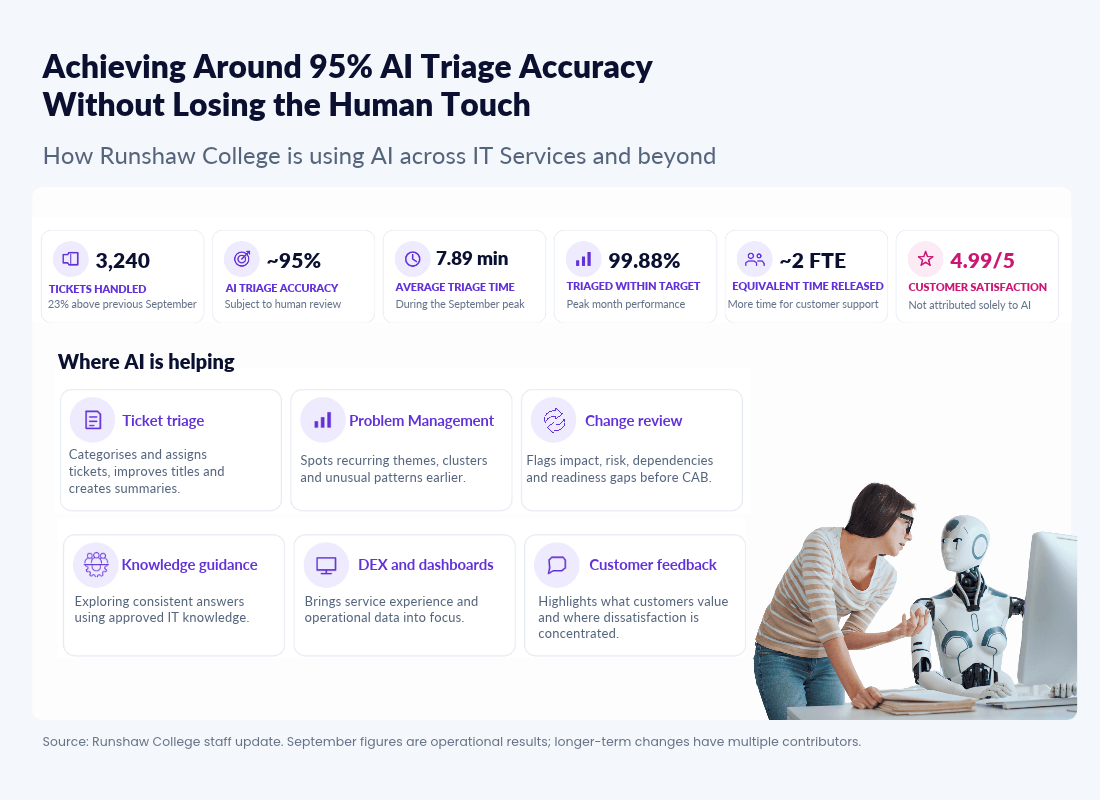
September gave us a practical test of how well this approach works. We handled 3,240 tickets, 23% more than the previous September, while AI triage was achieving around 95% accuracy. The time released was equivalent to the additional capacity of around two members of staff, leaving colleagues with more time for customers and the work that needs human judgement.
Artificial intelligence is already helping us improve how services work across the College. In IT Services, we’ve moved beyond isolated experiments and are using AI within established processes to handle demand, identify problems earlier and make better use of the information we already hold.
Our approach is practical. We’re looking for work that AI can organise, analyse or draft safely, leaving people with more time for investigation, judgement, conversation and improvement.
Across this work, we’re using AI within our existing technology estate and governance controls, including Microsoft Copilot, Jira Automation and Microsoft Foundry AI where appropriate. A key part of this work is Bobbie, our IT Services AI agent, which supports defined processes while colleagues remain responsible for the decisions and actions that follow. September provided the clearest example so far.
This also fits with the Association of Colleges Digital Transformation and AI Roadmap.
The main point for us is practical: use AI where it improves the student or staff experience, strengthens services and helps us make better use of time and information.
Some of these ideas came directly from the workshop we held as part of our World Class Service Desk Institute audit. That session helped us step back from individual tools and think about where AI could reduce friction, improve service quality and help colleagues spend more time on the work that needs human judgement.
It also links to our Quality Improvement Plan, where digital transformation, service quality and reducing Digital Friction are part of how we improve the experience for students and colleagues.
How we understand AI
We’re using recognised frameworks to keep the work practical, safe and people-centred. ITIL helps us understand the AI capabilities being used, Humanising AI reminds us that technology should support people rather than replace judgement, and SDC good practice helps us connect AI with service quality, customer experience and continual improvement.
The way Runshaw uses AI within agreed processes, with human review and clear responsibility, reflects the practical focus of Concept 10, “Managing the AI System”, in SDI’s Global Best Practice Standard for Service Desk v9. The concept covers areas including AI strategy, governance and compliance, and training and awareness.
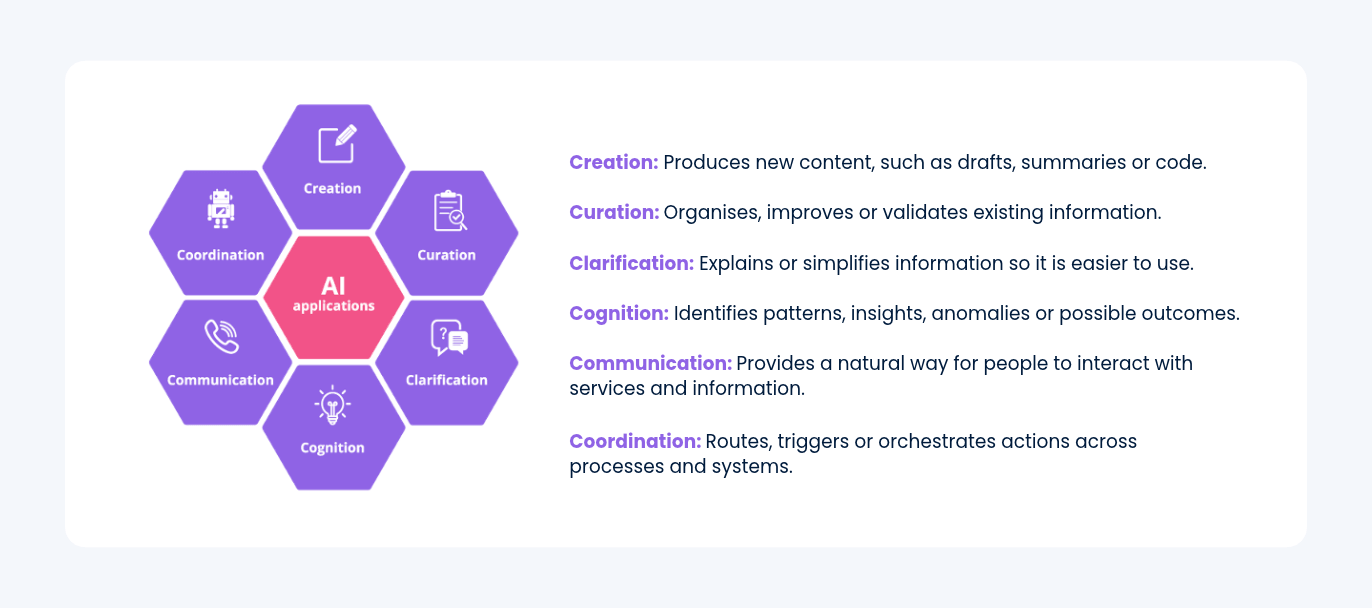
Throughout this article, each example includes a short “6Cs in use” explanation showing which capabilities are involved and how they contribute to the process.
We’re applying the College’s AI guardrails throughout this work so AI supports people safely, legally and responsibly.
Meet Bobbie
Bobbie is our IT Services AI agent and supports several of the capabilities described in this article. Bobbie is delivered using a combination of Microsoft Copilot capability and Jira Automation, working within our existing IT Services processes and controls. She works within defined processes to analyse information, prepare summaries and identify where attention may be needed.
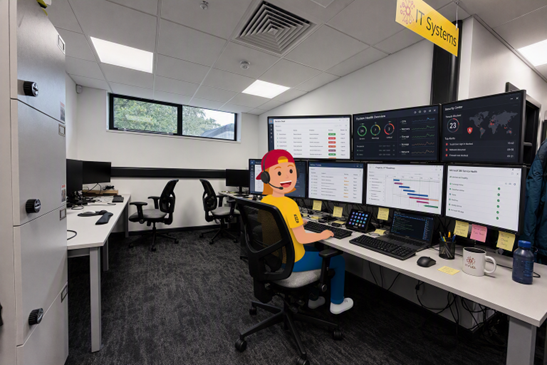
For example, Bobbie reviews proposed changes and provides observations about impact, risk, dependencies, testing and implementation readiness before a change reaches the Change Advisory Board (CAB). We’re also exploring how Bobbie can use approved IT knowledge to give colleagues useful and consistent guidance through the Service Desk.
6Cs in use:
Cognition: helps Bobbie interpret the information.
Clarification: makes complex points easier to understand.
Communication: presents findings clearly.
Coordination: places the output into the right operational process.
What AI helped us achieve in September
September was one of our busiest periods, with 3,240 tickets handled, 23% more than the previous September (our busiest month ever). Despite this, average triage time was 7.89 minutes, 99.88% of tickets were triaged within target, and customer satisfaction was 4.99 out of 5.
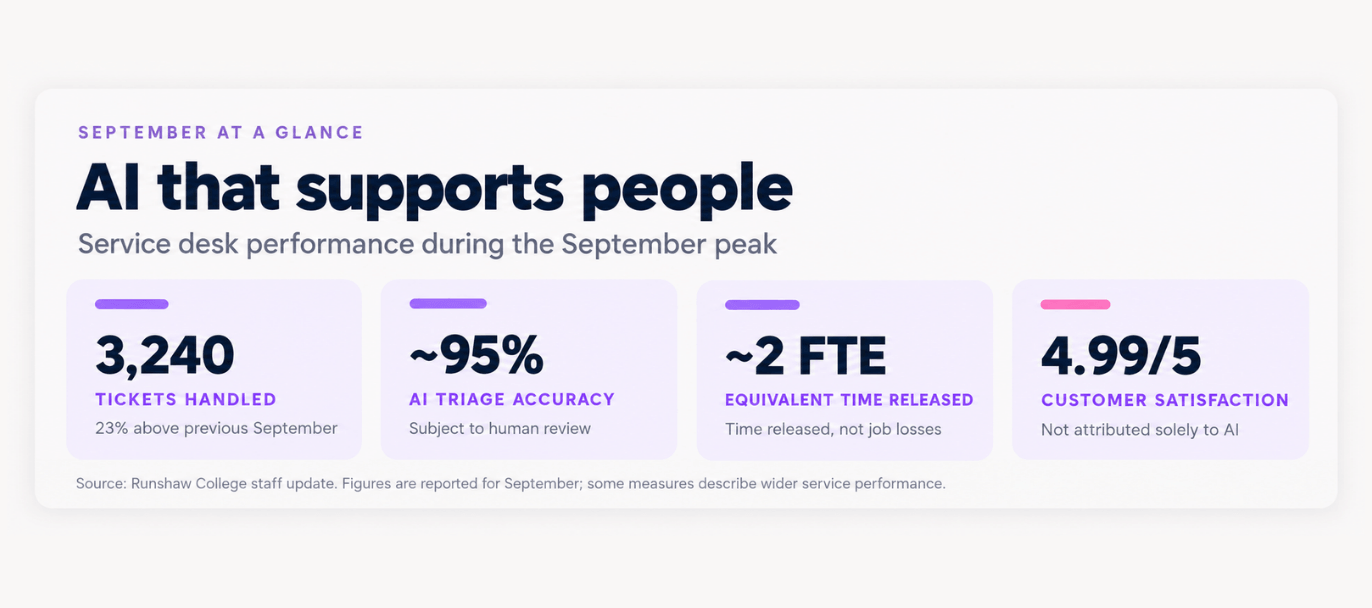
Our AI agent, Bobbie, supports the triage process by categorising and assigning incoming tickets, improving their titles and creating a short description. The capability was trained using a year of previous tickets and is currently achieving around 95% accuracy. Every result remains subject to human review, and Service Desk Team Leaders control the rules used by the process.
During the September peak, the time released was equivalent to the additional capacity of around two members of staff. That didn’t remove people from the process. It meant the team could spend more time helping customers, resolving issues and supporting the start of term.
How AI-assisted ticket triage works
- Ticket logged A request is submitted through the normal Service Desk route.
- Bobbie reviews the information The request is analysed against the triage model and agreed rules.
- Category, assignment, title and summary suggested Bobbie suggests the structure needed to move the ticket on quickly.
- Jira is updated The ticket is updated so the right team has clearer information at the start.
- The team reviews and acts A member of the team checks the ticket and remains responsible for the service response.
Bobbie supports the process. People remain responsible for the service and the decision.
6Cs in use:
Creation: produces the initial structured content.
Curation: organises the request.
Clarification: improves the title and summary.
Cognition: interprets the likely meaning.
Communication: makes the information more useful.
Coordination: routes the ticket into the right workflow.
Finding Recurring Problems Earlier
Triage helps us deal with individual requests. Our AI-assisted Problem Management work looks across multiple incidents to find recurring themes, clusters and unusual patterns.
Automated reviews take place every few hours, with a wider retrospective review each week. Potential problem candidates are summarised and routed into a dedicated Teams channel, where the team decides whether investigation or action is required.
AI doesn’t diagnose the root cause or decide that a Problem record should be raised. It organises and highlights the evidence so that the team can identify emerging issues earlier, investigate the likely cause and take preventative action through our established Problem Management approach.
This builds on several years of proactive Problem Management. The proportion of Service Desk tickets recorded as incidents fell from 50.6% in 2016/17 to 8.0% in 2025/26. Structured Problem Management is one evidenced contributor to that improvement, alongside monitoring, automation, knowledge, service design and improved ticket categorisation. The AI capability is new, so we aren’t attributing that historic improvement to AI.
6Cs in use:
Cognition: helps identify emerging patterns.
Curation: organises the strongest candidates.
Communication: explains the signals behind them.
Coordination: brings them into the Problem Management process.
A Critical Friend for Change Management
Bobbie is also helping us improve the quality of proposed changes before they go live. The AI change review considers potential impact, dependencies and technical, operational and business risks. It challenges gaps in the justification, checks whether implementation, testing, communication and backout planning are clear, and returns observations for the change author and Change Advisory Board (CAB).
The change author considers Bobbie’s observations, strengthens the change where necessary and records how any material concerns have been addressed. CAB then makes the decision using the full change record and the relevant professional and technical advice.
Bobbie acts as a critical friend. It doesn’t approve the change, replace specialist review or remove accountability from the people involved.
Cs in use:
Cognition: identifies possible gaps and risks.
Clarification: explains why they matter.
Communication: presents the review clearly.
Coordination: places it at the right point in the change process.
Understanding the digital experience
Traditional monitoring tells us whether a device or service is technically available. Digital Experience Management (DEX) helps us understand whether it’s working well for the person using it.
We’re combining digital experience data with AI-supported analysis to identify patterns involving device health, performance, stability and the wider user experience. This helps us find emerging issues earlier and connect them with our Problem Management approach, so the team can investigate underlying causes and focus its effort where it will have the greatest effect.
The intention is to move from reacting to individual reports towards identifying patterns, testing the evidence and resolving issues before they affect more staff or students.
6Cs in use:
Curation: brings together information from different measures.
Cognition: identifies patterns and exceptions.
Clarification: turns technical evidence into a practical next action.
Turning information into operational dashboards
We’re also using AI to create quick operational dashboards that bring information together for management and governance meetings.
For the Systems Steering Group, this has helped us create a clearer view of the systems estate, including ownership, RAG ratings, development priorities and areas requiring discussion. The refreshed dashboard formed part of the October meeting and Copilot helped reduce the time needed to create it.
We’re taking a similar approach with Cyber Club. Dashboards and focused meeting papers bring together relevant cyber security, data protection, risk and assurance information so the group can spend less time assembling the picture and more time discussing exceptions, risks and action.
These outputs still need checking. AI can accelerate the analysis and presentation, but meeting owners remain responsible for confirming that the information is current, properly understood and suitable for the decision being made.
6Cs in use:
Curation: brings information into one view.
Cognition: highlights patterns and exceptions.
Clarification: makes the position accessible.
Communication: supports discussion.
Coordination: links findings to owners and actions.
Turning reporting and feedback into action
AI is helping us produce richer monthly analysis without replacing management review. Our September report brought together operational performance, customer satisfaction, workload themes, service exceptions and data-quality checks.
We’re also analysing customer feedback each week. The output highlights what customers value, where dissatisfaction is concentrated and whether comments point towards a recurring service or process issue.
Where a theme is identified, we check the relevant tickets and process, agree an owner and record the resulting improvement action. This makes the analysis useful beyond the report itself and helps us confirm whether the change has improved the customer experience.
6Cs in use:
Curation: organises feedback.
Cognition: finds recurring themes.
Clarification: separates evidence from assumptions.
Communication: explains the finding.
Coordination: turns it into an owned action.
Extending the approach beyond IT
The same capabilities can help other College services work with their data.
In Finance and Facilities, we’ve begun analysing weekly catering sales and using historic transaction patterns to support income forecasting. The data is anonymised into broad customer groups rather than analysing individual spending behaviour, and we’ve deliberately avoided profiling individual customers.
We’re also applying AI-supported analysis to health and safety near misses. The work brings near-miss reports together with existing risk assessments so that recurring hazards, existing controls and possible gaps can be reviewed more consistently. The resulting monthly view can help colleagues focus on prevention, control effectiveness and the actions needed to strengthen risk management.
6Cs in use:
Curation: organises operational records.
Cognition: identifies trends.
Clarification: explains evidence and risk.
Communication: presents findings clearly.
Coordination: links them to review and action.
Using insight to support students
Some of our most important experiments are taking place within the Staff Portal, where the focus is on helping colleagues support students more effectively. This work is being developed through Microsoft Foundry AI, within our existing Microsoft estate and subject to the College’s normal data protection, cyber security and access controls.
We’re developing ideas that could bring together information from attendance, warnings, progress updates, pastoral logs, next steps and other approved College records. The aim is to help Progress Mentors and teachers prepare for conversations by presenting a balanced colleague-facing summary of progress, achievements, risks and possible areas for discussion.
This could reduce the time colleagues spend gathering information from separate places and lower the risk of an important issue being overlooked. It would also sit alongside other risk identification analysis work, including the work from QMIST, so colleagues have a fuller picture without creating another separate stream of alerts, actions or follow-up. It wouldn’t make decisions about a student or provide advice directly to them. Staff would check the source records, use their professional judgement and remain responsible for any resulting action.
Alongside this, we’ve been involved in exploratory work around AI-assisted marking, AI-supported personal statement creation and support plan work, including SSPs. The focus is on reducing avoidable administration and improving consistency, while keeping professional judgement, safeguarding, assessment integrity and data protection at the centre of the process.
Because this involves children’s data and information that may be sensitive, the student insight work has been subject to a DPIA and cyber risk analysis. Any live capability will still need a clear purpose, role-based access, transparency, quality testing and meaningful human oversight.
6Cs in use:
Curation: assembles the information.
Cognition: identifies patterns.
Clarification: creates manageable colleague-facing summaries.
Communication: supports better conversations.
Coordination: connects insights with follow-up.
Keeping people in control
AI is already helping us remove avoidable work, spot issues earlier and make better use of the information we hold. The important point is that we’re using it within real processes, with clear ownership, human review and the right controls around the work.
We’ll keep focusing on practical uses that improve services, reduce Digital Friction and support colleagues. Where AI helps, we’ll build on it. Where it doesn’t, we’ll stop, adjust or take a different approach.