

Skip to content

Service Desk Analyst Qualification Course: Choose your date Down arrow

Leadership Lessons: How to Run a Blameless Post-Incident Review

Leadership Lessons: How to Run a Blameless Post-Incident Review

17/11/26 By antonija
Back to resourcesBack to Resources

By John Noctor, SDI Chief Customer Success Officer

More from Leadership Lessons ➡️ Read: The Button Next to the Door
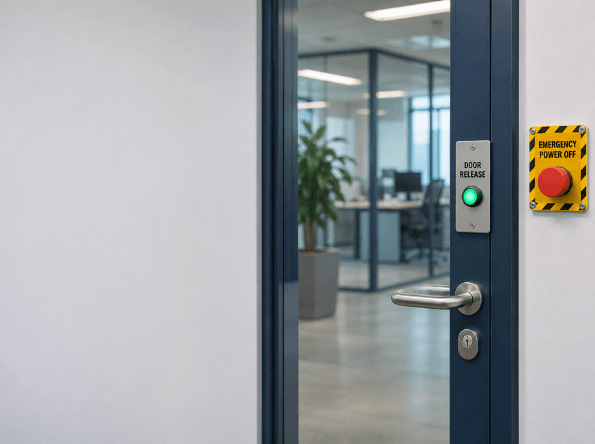
In the recent “The Button Next to the Door” blog, I shared the story of the day I took the mainframe offline for users across the country, the day before my interview for senior operator.
I didn’t walk a visitor out. He pressed the wrong button, and suddenly everything shut down.
It would be easy to sum up that incident in one line: operator error. Case closed, lesson learned, just try harder next time. But that kind of write-up would miss almost everything important.
Why was the emergency power-off button right next to the door release, with nothing to tell them apart if you were in a rush? Why was letting users into the tape section “slightly against protocol,” but so common that nobody thought twice? Why did a young operator think fixing the problem fast was more important than walking someone to the door?
These are the questions a blameless post-incident review should ask. They’re also the questions that help prevent the same thing from happening again.

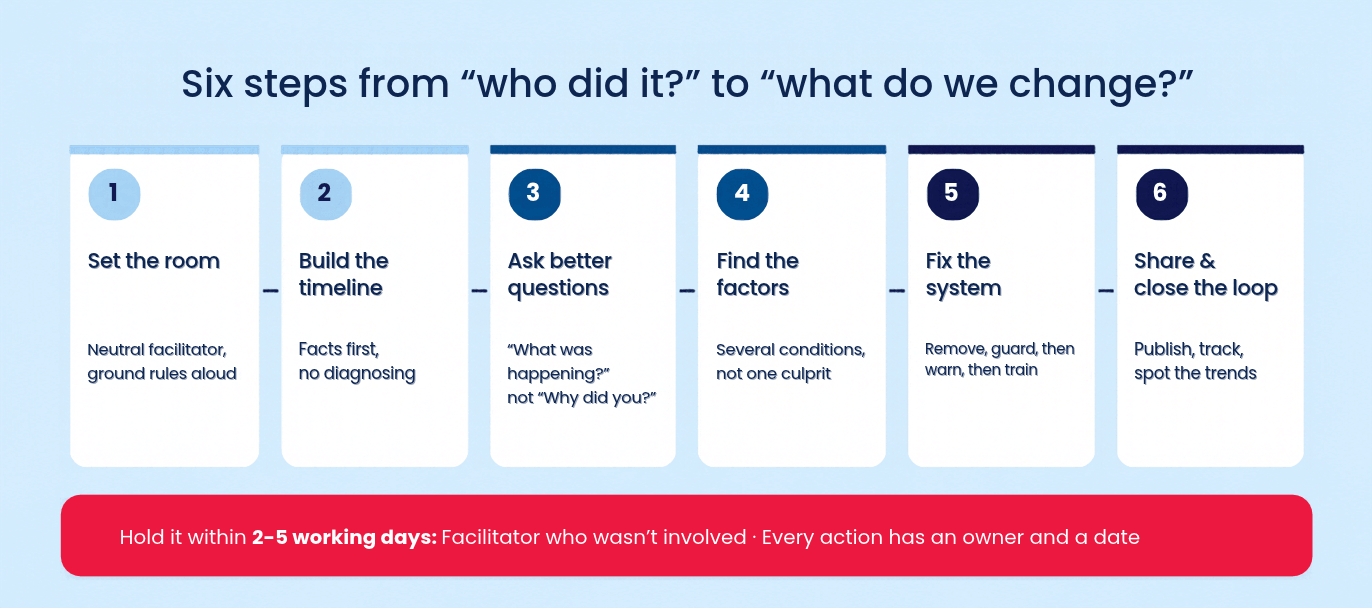
Here’s how you can run one.


First, what “blameless” actually means

Blameless doesn’t mean there’s no accountability. It doesn’t involve ignoring mistakes or giving everyone a gold star just for showing up. It means starting with one assumption: the people involved did what made sense to them at the time, given the information, tools, and pressures they faced.


If it made sense to them at the time, it will make sense to the next person too. That’s what you need to fix.


The idea isn’t new. Safety researcher Sidney Dekker has spent decades arguing that “human error” is where an investigation should start, not where it ends. John Allspaw brought the same thinking to tech operations at Etsy, and Google’s Site Reliability Engineering teams built it into how they run postmortems.

In service management terms: blame closes the incident. Learning closes the problem.
 

When to run one

You don’t need a full review for every password reset. Run one when:

🔹 Any Priority 1 or major incident.

🔹 A near miss that could have been a Priority 1.

🔹 The same incident type keeps coming back.

🔹 Anything that surprised you, even if the impact was small.


Near misses are like bargains in the incident world. You get all the lessons without the outage.
Aim to hold the review within two to five working days, while memories are fresh, but tempers have cooled.


Step 1: Set the room up properly

Who facilitates matters more than almost anything else. Choose someone who wasn’t directly involved and isn’t the most senior person in the room. If the boss runs it, people will tell the boss what they think the boss wants to hear.
Invite the people who were hands-on, plus anyone who owns the processes or tools involved. Keep it small enough that people will talk.


Start by reading the ground rules out loud every time:

🔹 We’re here to understand what happened, not to decide who’s to blame.
🔹 Nobody will be disciplined for anything said honestly in this room.
🔹 No “should have”. We’re looking at what made sense at the time.
That second rule only works if it’s true. One review that ends in a disciplinary will set your culture back years.


Step 2: Build the timeline before anyone explains anything

Start with facts, not opinions. What happened, in what order, and who knew what at each step? Pull from ticket history, monitoring alerts, chat logs, call recordings and change records. Put it all on one timeline everyone can see.


Pay special attention to decision points—the moments when someone chose one action over another. That’s where the learning happens.
Resist the urge to diagnose while you build. “And then the visitor pressed the emergency power off” is a timeline entry. “Because the operator didn’t follow procedure” is a conclusion, and it’s too early for those.


Step 3: Ask better questions

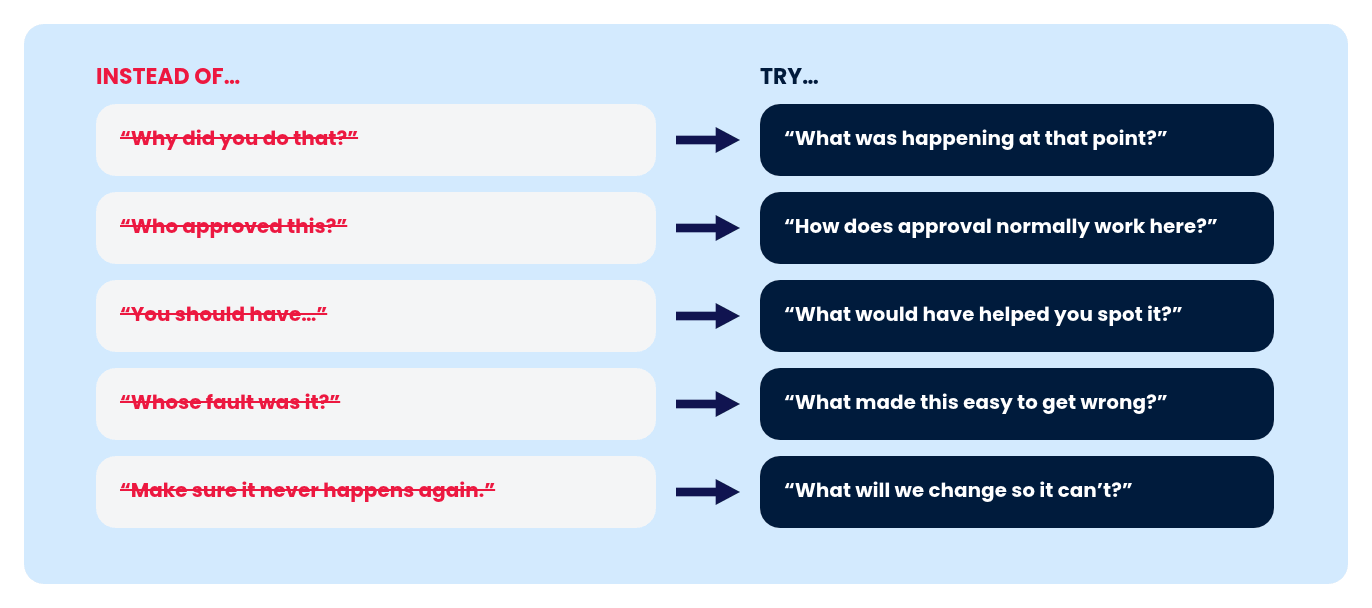
The questions you ask decide the answers you get. “Why did you do that?” puts someone on trial. “What was happening at that point?” invites them to help you understand.
A chart comparing five accusatory phrases under INSTEAD OF... with five constructive alternatives under TRY... connected by arrows.
Ban the words “should have.” They’re just hindsight pretending to be analysis. Of course I should have walked that man to the door—I realised that by lunchtime. What matters is why it didn’t seem necessary at eleven that morning.


Step 4: Look for contributing factors, not one root cause

Incidents rarely have a single cause. They have a handful of conditions that happened to line up on the same day.
The classic “five whys” is useful, but it has a habit of stopping at a person. Why did the outage happen? The visitor pressed the button. Why? The operator didn’t escort him. Why? The operator broke protocol. Full stop, blame applied, nothing learned.


Instead, ask what contributed across a few areas:

🔹 Process: was the procedure clear, practical and routinely followed?
🔹 Design: did the tools, layout or interface make the mistake easy?
🔹 Information: did people have what they needed to make a good decision?
🔹 Pressure: what workload, targets or time pressure were people under?
🔹 Knowledge: had anyone been shown how to do this safely?
In my case, the answer is “yes” in nearly every box. That’s not an excuse for what I did. It’s a map of where to fix things.


Step 5: Agree actions that change the system
This is where most reviews fall over. The meeting goes well, everyone nods, and the actions say “remind staff to follow procedure” and “be more careful”.
Those aren’t actions. They’re hopes.
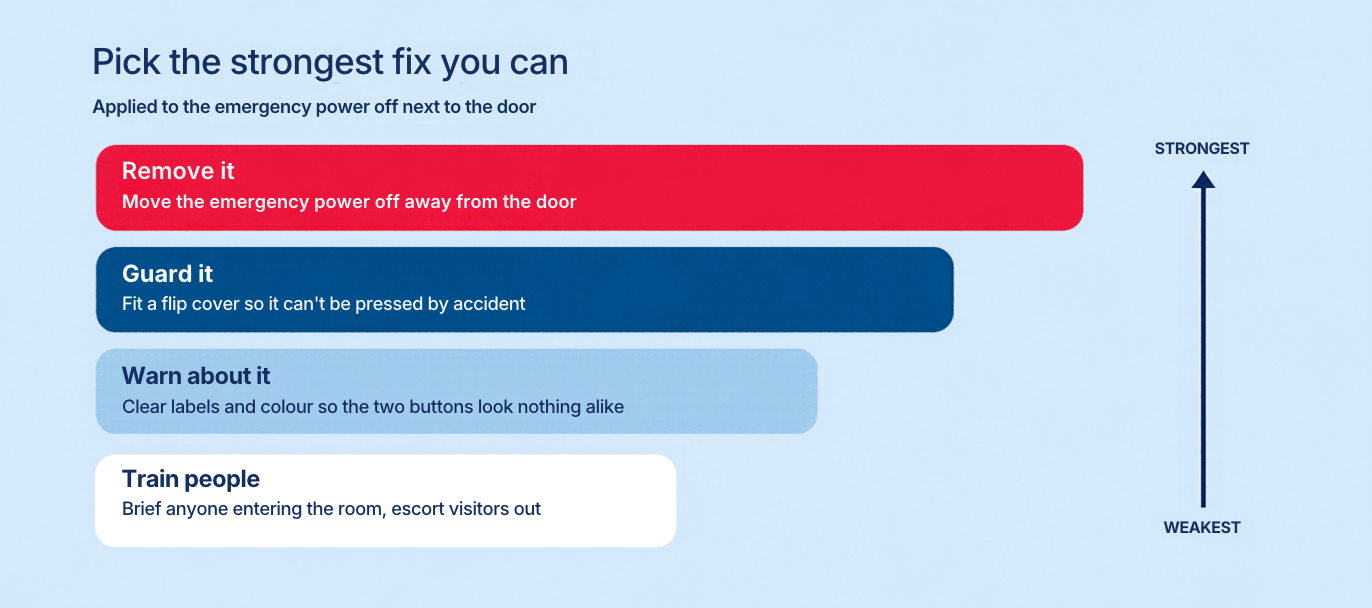
Good actions make the right thing easier and the wrong thing harder. When you’re choosing between fixes, work down this list and pick the strongest one you can:


A flip cover on that emergency power off button would have done more than any number of reminders to “please be careful.” That’s why so many emergency power off buttons have covers now.
Every action needs a named owner and a date. Log it against a problem record so it doesn’t get lost in somebody’s inbox.


Step 6: Share it and close the loop

A review that sits in a folder hasn’t taught anyone anything.
Publish a short write-up widely: what happened, what contributed, what you’re changing. Keep names out unless people are happy to be named. Better still, invite them to tell the story themselves.


Then track the actions to completion, and look across reviews every quarter. If the same contributing factors keep appearing, that isn’t a run of bad luck. It’s a problem waiting for an owner.

Signs your review isn’t really blameless

🔹 The write-up names a person as the root cause.

🔹 The most senior person did most of the talking.

🔹 People are noticeably quieter than in normal meetings.

🔹 The actions are mostly retraining and reminders.

🔹 Someone was disciplined afterwards for what they said in the room.

🔹 The same incident turns up again within six months.

If you spot two or more, it’s worth reviewing the review.
 

The real test

You’ll know your post-incident reviews are working when one thing changes: people put their hand up faster.
When an engineer messages the team at 9:05 to say, “I think I’ve just broken something,” rather than hoping nobody notices until 11, you’ve built something valuable. Fewer hidden mistakes mean shorter outages, better data and fewer repeat incidents.
The visitor who hit my button wasn’t the problem. Neither, really, was I. The problem was a room where that mistake was easy to make.


Fix the room, and you fix it for everyone who walks through the door next.


Free template

Blameless post-incident review

Use this as the agenda and the write-up. Keep it to two pages.

Blameless post-incident review template
Section What to capture Your notes
01Incident Reference, date, priority, services affected
02Impact Who was affected, for how long, and how badly
03Timeline Key events in order, with times. Mark each decision point.
04What made sense at the time For each decision point: what did people know, and what were they trying to achieve?
05Contributing factors Process · Design · Information · Pressure · Knowledge
06What went well What limited the damage or sped up recovery?
07Actions Each one: the change, owner, due date, problem record. Remove, guard, warn or train?
08Shared with Who has seen the write-up, and when
09Follow-up date When you’ll check the actions are done and working
Ground rules to read aloud
We are here to understand, not to blame. Nobody will be disciplined for anything said honestly in this room. No “should have”.

Download the Word template

Leadership Lessons: The Button Next to the Door

Leadership Lessons: The Button Next to the Door

By John Noctor, SDI Chief Customer Success Officer   What a nationwide outage taught me about mistakes, experience and learning the hard way. I’ve made...

Read More
10 Signs Your Service Desk Needs a Health Check

10 Signs Your Service Desk Needs a Health Check

A high-performing service desk is essential for delivering quality IT support, maintaining end-user satisfaction, and enabling the wider business. But under pressure from...

Read More
5 Proven Ways to Optimise Your IT Service Operation (That Most Teams Overlook)

5 Proven Ways to Optimise Your IT Service Operation (That Most Teams Overlook)

At SDI, we believe Service Desks should shine and be recognised. Whether you’re leading a small internal support team or a large-scale IT operation, your goal is the same:...

Read More
Achieving Process Consistency for Effective IT Support

Achieving Process Consistency for Effective IT Support

Process consistency is a challenge for many support organisations. It requires a number of elements to be in place to work effectively, which we will explore shortly....

Read More
Advanced Incident Management Tools for IT Support Teams: Features to Consider

Advanced Incident Management Tools for IT Support Teams: Features to Consider

We're moving beyond the old days of basic ticket-logging tools. Advanced incident management can now significantly reduce downtime by being fully automated and AI-powered,...

Read More
Best Practice for Managing Service Desk Teams [+ Case Study Examples]

Best Practice for Managing Service Desk Teams [+ Case Study Examples]

For many organisations, the service desk is the beating heart of the user experience. It is the centre of operations that keeps everything going smoothly. However,...

Read More