



 Back to Resources
Enterprise service management (ESM) applies service-management principles, workflows and technology across the organisation, not only within IT. It gives employees a clearer way to request help, follow progress and find guidance, while helping service teams manage work consistently.
This means that rather than each department relying on separate email inboxes, spreadsheets and informal processes, ESM creates a more connected service experience.
So, the focus should be on making internal services easier to access and deliver, not on forcing every team to work in the same way.
In this blog, we’ll cover:
🔹What Enterprise Service Management Means
🔹ESM Versus ITSM
🔹Some Departmental Use Cases of ESM
🔹What Are the Core Platform Requirements
🔹Governance and Ownership
🔹Assessing ESM Readiness
🔹What Are Some Common ESM Risks
🔹ESM Platform Checklist
What Enterprise Service Management Means
In short, ESM combines people, processes and technology to manage internal services in various functions, including HR, facilities, finance, legal and security. Typically includes a common platform for service catalogues, requests, workflows, knowledge and reporting.
An effective ESM approach can help organisations to:
✅Give employees a single, straightforward place to request support and services.
✅Standardise repeatable work without removing necessary flexibility.
✅Improve visibility of ownership, workload, service targets and request status.
✅Reduce manual hand-offs between departments.
✅Reuse knowledge and automate standard, low-risk activities.
✅Provide leaders with better insight into demand, delays and opportunities for improvement.
ESM Versus ITSM
IT service management (ITSM) focuses on designing, delivering, supporting and improving technology services. ESM extends suitable service-management practices beyond IT to improve how internal teams serve employees and other business functions.
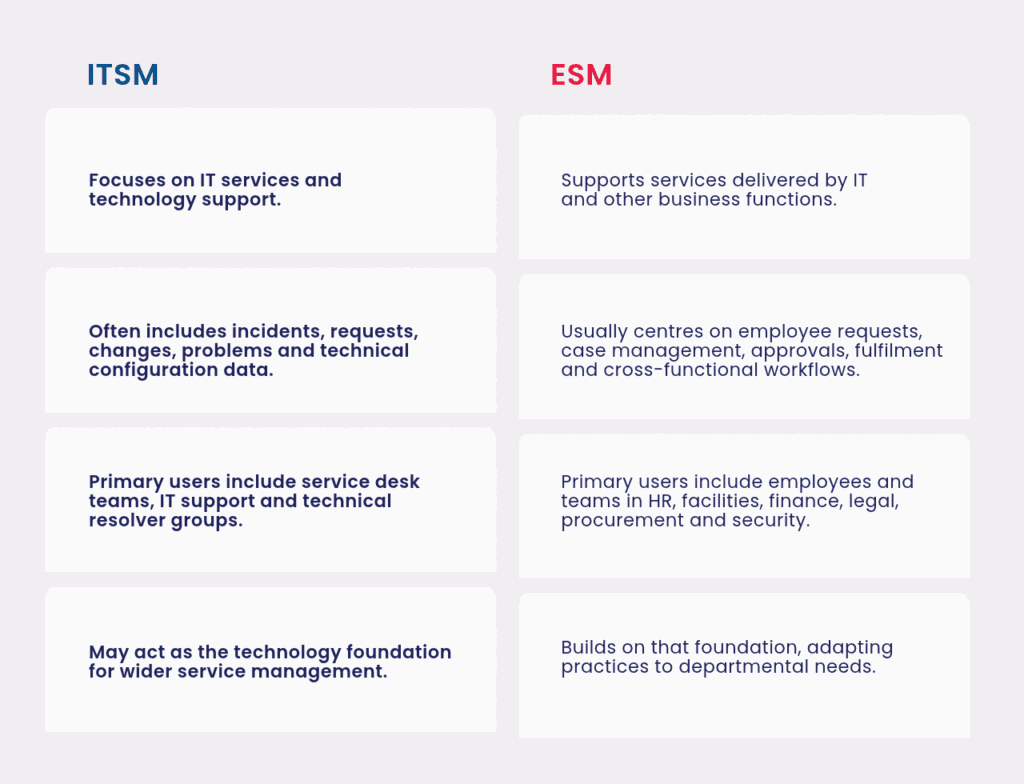
Don’t use IT buzzwords and processes throughout the organisation, as ESM isn’t that. Depending on the facilities request, HR case or legal review, other data, ownership and confidentiality requirements and expectations apply.
Here Are Some Departmental Use Cases
ESM can support high-volume, repeatable services across multiple business functions. Below are some examples of the departmental use cases.
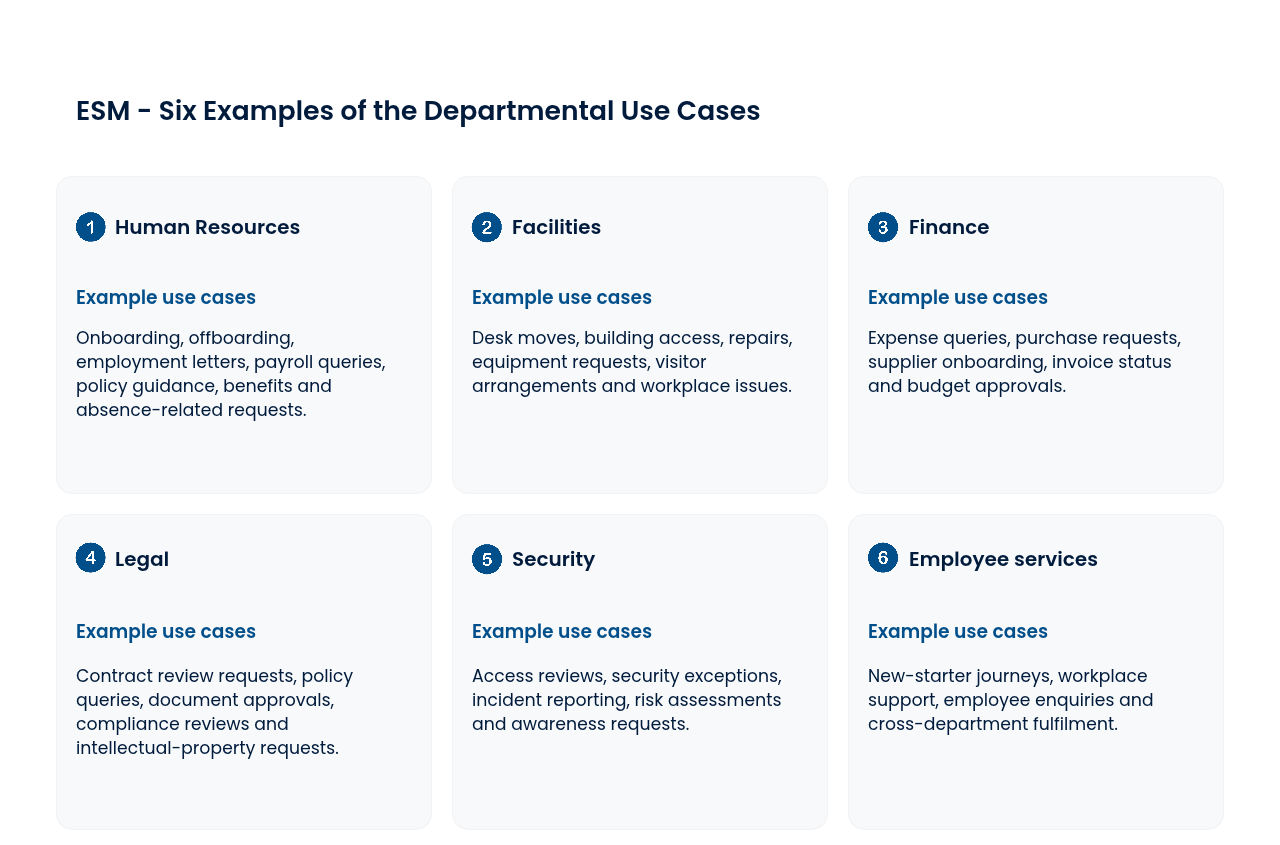
The strongest early use cases tend to be services with clear demand, repeated steps, identifiable owners and an authentic employee-experience problem to solve.
What Are the Core Platform Requirements
A good ESM platform should enable common capabilities and design services that make sense for each function’s work.
🔹Service catalogue: A searchable catalogue that is clear and informs employees what services are available and what information is needed.
🔹Workflow and case management: Route, approve, assign, alert, and hand off cases and workflows across teams, all configurable.
🔹Automation: Automate predictable and low-risk activities like task creation, approval requests, notifications and access provisioning.
🔹Knowledge Management: Helpful, up-to-date information that can help employees with simple needs before they submit a request.
🔹Employee experience: Easy access, clear request forms, clear communication of progress and help through relevant channels.
🔹Integration: Connections with HR systems, identity platforms, finance tools, collaboration platforms, facilities systems and IT service-management software.
🔹Reporting: Insight into volume, backlog, fulfilment times, demand patterns, staff satisfaction and service performance.
🔹Security and privacy: Appropriate permissions, audit trails, confidentiality controls and handling of confidential employee or commercial data.
Governance and Ownership
ESM is a business change initiative, not just an IT platform deployment. IT may provide technology expertise and platform administration, but business functions must own their services, policies, content and outcomes.
Define the following prior to scaling:
- Service owners responsible for service design and performance.
- Process owners for workflows, controls, and improvement.
Content owners who maintain catalogue records and knowledge in a timely and accurate way - Data Owners of sensitive/regulated information.
- A governance group that prioritises demand, agrees standards and resolves cross-functional issues.
- Shared design principles covering language, employee experience, data quality, accessibility and automation.
A common platform does not require every department to have identical processes. It does require enough shared standards to make the experience consistent and the platform manageable.
Assessing ESM Readiness
Before selecting or extending a platform, assess whether the organisation is ready to deliver services in a more structured way.
Start with a small number of high-value services and ask:
- Is the service understood from the employee’s perspective?
- Is there a named owner who can make decisions about the process?
- Are the steps repeatable enough to document and improve?
- Is the required data known, proportionate and appropriate to collect?
- Are hand-offs, approvals and service expectations clear?
- Can the team maintain the service catalogue, knowledge and workflow after launch?
- Does the process require integrations with systems such as HR, identity, finance or facilities software?
- How will the organisation measure whether the employee experience has improved?
When choosing an ESM platform, assess the ability to support these needs at a realistic level of complexity. Consider usability for employees and fulfilment teams, workflow flexibility, integration options, data protection, reporting, administration effort, vendor support and total cost of ownership.
What Are Some Common ESM Risks
ESM programmes can bog down in bringing in technology instead of focusing on service design and adoption.
Key risks include:
- Imitating bad IT processes: Complex IT workflows in other parts of the business cause friction and do not necessarily enhance service.
- Over-automation: Automating without understanding a process maximises the likelihood of making bad decisions.
- Difficult catalogue use and unclear progress lead employees to fall back on email and informal channels.
- Fragmented ownership: This is when there’s no clear accountability between IT and business functions.
- Inconsistent data: Poor data standards decrease reporting quality and inhibit reliable integrations.
- Attempting to change too much at once: An initial phase with too many departments or services to own, design, and manage can overwhelm capacity.
A phased approach is usually more effective: choose a clear service, design it with the people who deliver and use it, pilot the experience, measure the outcome and then expand.
ESM Platform Checklist
Use this checklist when comparing enterprise service management software:
✅ Delivers a straightforward employee platform and searchable service catalogue.
✅ Supports workflows, task management, approvals and cross-functional hand-offs.
✅ Allows departments to configure services without uncontrolled customisation.
✅ Enables appropriate automation, with clear exception and escalation routes.
✅ Includes knowledge capabilities that are easy to maintain and use.
✅ Integrates with core HR, identity, finance, collaboration, facilities and IT systems.
✅ Offers role-based permissions, audit trails and suitable controls for confidential data.
✅ Provides reporting on demand, workload, fulfilment, delays and employee experience.
✅ Can be governed and administered with the people and skills available.
✅ Supports gradual expansion without requiring all departments to adopt identical processes.
✅ Has transparent implementation, licensing and ongoing operating costs.
Related Resources
Explore more SDI resources to support your IT service management journey, including our guides:
➡️ ITSM and Service Desk Software
➡️ Comprehensive Guide to ITSM Tool Selection