




Incident management tools help service teams restore normal service as quickly as possible when something goes wrong. The right platform brings together incident logging, triage, communication, escalation and improvement activity, so teams can respond consistently rather than relying on inboxes, spreadsheets or disconnected chat threads.
For software evaluators, the key question is not simply which tool has the longest feature list. It is whether the tool supports the way your teams need to detect, manage, communicate and learn from incidents.
What Incident Management Tools Do
Incident management software supports the full incident lifecycle: identifying an issue, logging it, assessing impact and urgency, assigning ownership, resolving service disruption, communicating with stakeholders and recording learning afterwards.
A well-configured tool should help teams to:
- Capture incidents from users, service desks, monitoring platforms and automated alerts.
- Classify incidents consistently by service, category, impact and urgency.
- Apply prioritisation rules, service-level targets and escalation paths.
- Route work to the right resolver group or on-call colleague.
- Coordinate major incidents across IT, suppliers and business stakeholders.
- Maintain a clear record of actions, decisions, updates and resolution details.
- Link recurring incidents to problem records, changes, configuration items and known errors.
- Turn incident data into reporting that supports continual improvement.
The purpose is not to make incident handling more bureaucratic. It is to reduce uncertainty, avoid delays and give customers clear, timely information when a service is disrupted.
Essential Features
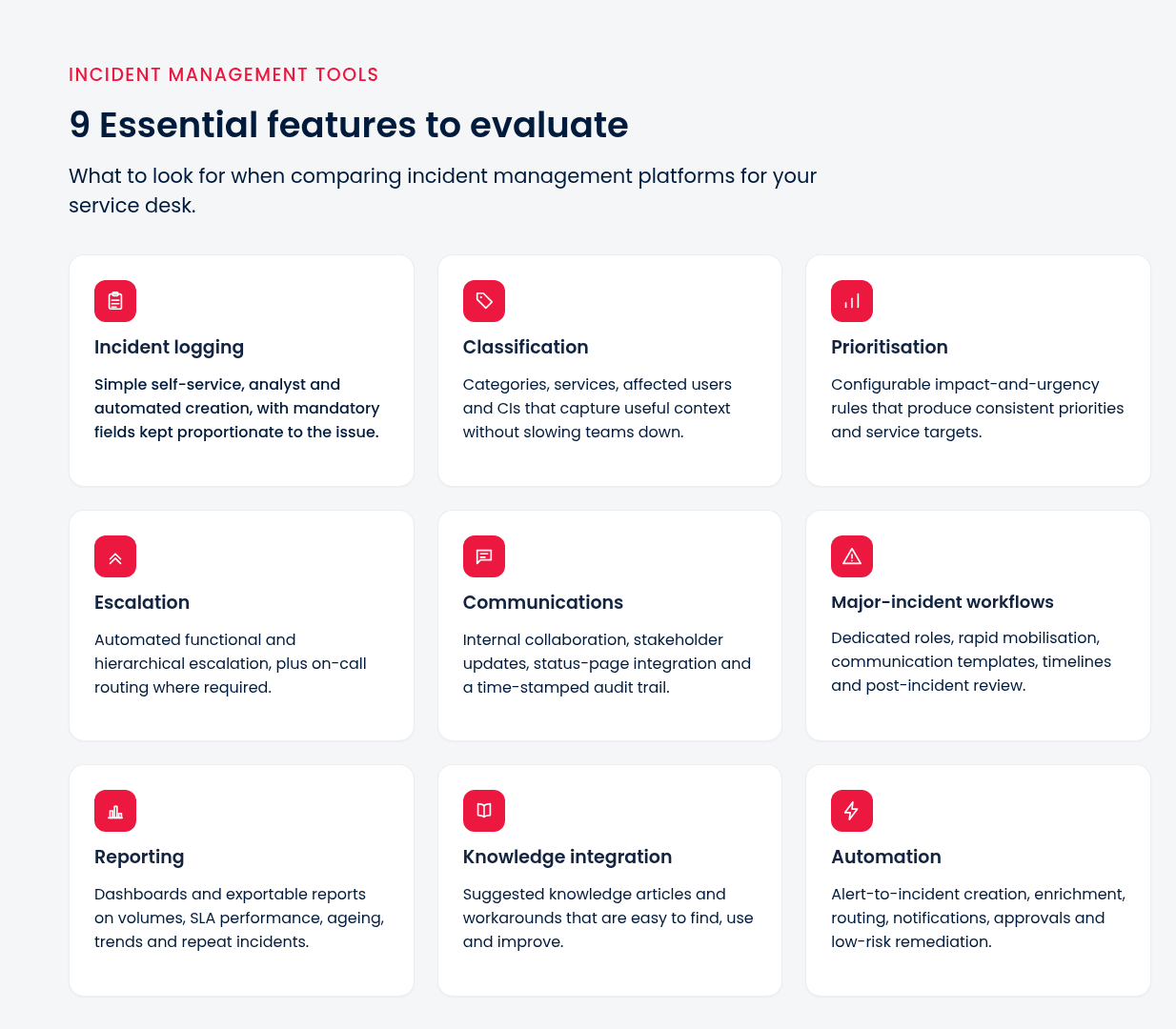
A useful evaluation starts with the capabilities your teams will actually use under pressure.
Some of these capabilities include the following:
- Incident logging
- Classification
- Prioritisation
- Escalation
- Communications
- Major-incident workflows
- Reporting
- Knowledge integration
- Automation
Advanced platforms can enrich incidents with configuration, change and monitoring data, as well as link updates across collaboration and status tools. These capabilities can reduce context switching, but only create value when the underlying processes and ownership are clear.
Incident Tools and Related Platforms
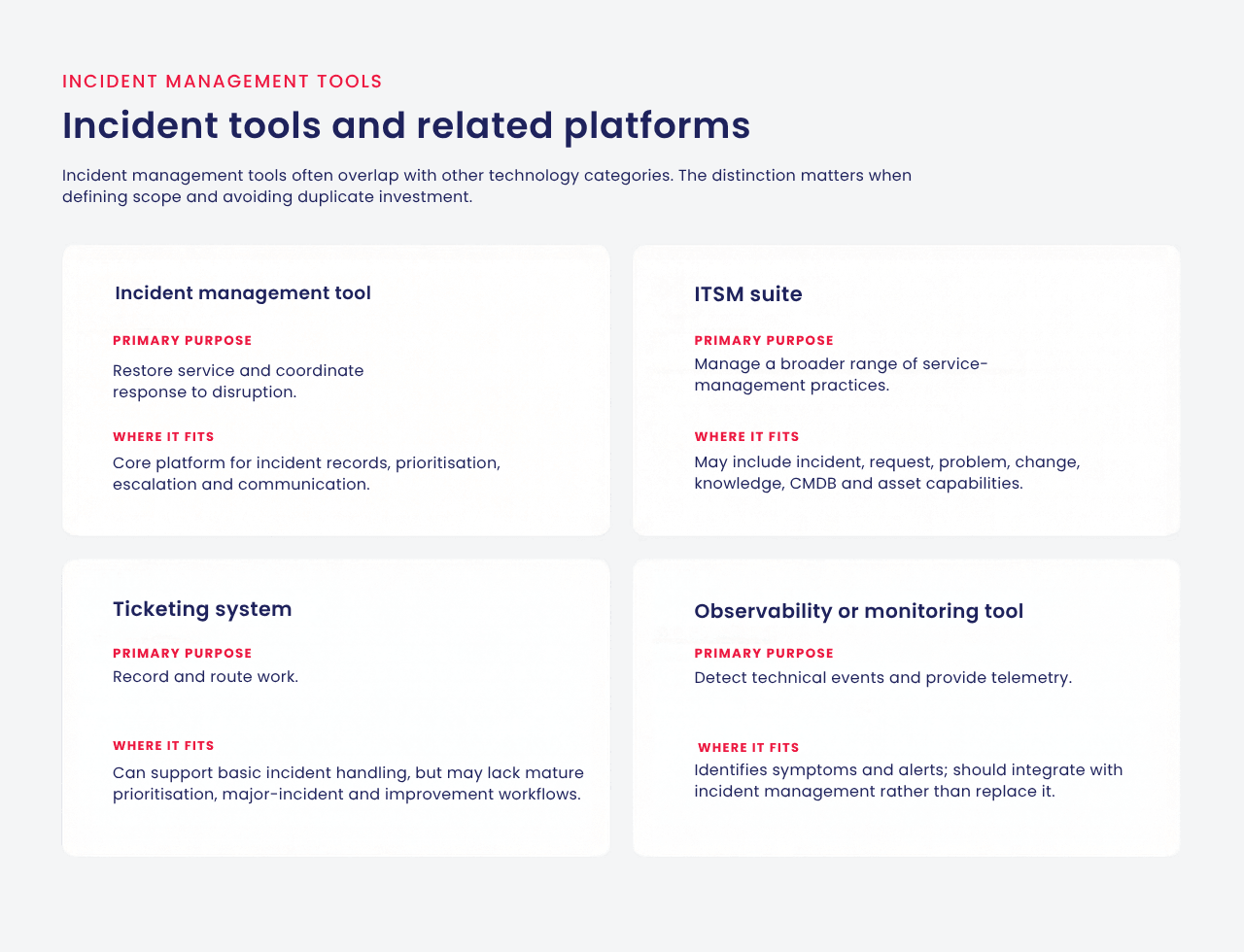
Incident management tools often overlap with other technology categories. The distinction matters when defining scope and avoiding duplicate investment.
An ITSM service desk tool typically centralises incidents, requests, changes and service delivery activities. An incident-focused capability may be sufficient for a narrow operational need, while a wider ITSM suite may be more appropriate where service management is already mature or is expanding beyond IT.
Evaluation Criteria by Complexity
🔹 Small Teams
Simple configuration, quick adoption, and reliable core functionality often work best for smaller teams. Focus on ease of administration, intuitive analyst screens, practical reporting, sensible integration options, and transparent total cost.
Avoid buying enterprise complexity for a team that needs consistent logging, assignment, communication and basic service-level control. SDI recommends that smaller organisations assess admin simplicity, onboarding, reporting usability, integration effort and the cost of extending the platform over time.
🔹Growing Organisations
As volumes, services and resolver groups increase, look for flexible service structures, automation, stronger integrations and reliable reporting. Consider whether the tool can support different workflows without creating an unmanageable level of customisation.
Test integrations with identity management, monitoring, knowledge, collaboration and customer communication channels. Integration is important because it helps create a connected operational view rather than another isolated system.
🔹Complex Enterprises
More complex and/or regulated organisations may require complex major incident management, multi-team routing, auditability, fine-grained access levels, supplier integration, CMDB linkage and support for multiple business functions.
Evaluate scalability, resilience, data governance, implementation capacity and the vendor’s ability to support your operating model over time. A good platform should enable standardisation where it helps, while allowing justified variation between services and teams.
Implementation Pitfalls
In tool projects, teams tend to focus more on configuration than on the flow of work, and as a result, projects underperform.
Common pitfalls include:
- Recreating all the legacy workflows rather than simplifying them.
- Creating categories and forms to capture too much information for individuals to manage.
- Not establishing clear service targets or owners of the priority and escalation rules.
- Starting automation before exceptions, approvals and audit needs are known.
- Sending low-quality historic information for no reason.
- Testing only happy path cases and not realistic disruptions.
- Focusing on training as a single event rather than supporting each role through adoption.
- The use of go-live completion as a measure of service outcomes.
A controlled pilot, scenario-based testing, role-based training and post-go-live measurement are practical ways to reduce implementation risk.
Example Workflow
A typical incident workflow may look like this:
- A user reports an inability to access a business application, or a monitoring tool generates an alert.
- The tool creates an incident and captures the affected service, user impact, time reported and relevant technical context.
- The service desk validates the issue, assigns impact and urgency, then applies the appropriate priority.
- Routing rules assign the incident to the correct resolver group, with escalation triggered if targets are at risk.
- If the disruption is widespread or high impact, a major-incident workflow begins, with named roles and regular stakeholder updates.
- The resolver team identifies a workaround or resolution and documents actions taken.
- The incident is resolved and confirmed with the user where appropriate.
- Repeat incidents, unresolved root causes and improvement actions are linked to problem management or change management.
- Reporting identifies trends, recurring failure points and opportunities to prevent future disruption.
Incident Management Tool Scorecard
Use this checklist when shortlisting platforms. Score each area from 1 to 5, then validate the highest-scoring tools through real workflow demonstrations.
✅ Supports your current incident, escalation and major-incident processes.
✅ Is easy for analysts, resolver teams, managers and end users to use.
✅ Applies prioritisation, SLA and routing logic consistently.
✅ Integrates effectively with monitoring, identity, collaboration, knowledge and status communications.
✅ Enables fast, controlled stakeholder communication during major incidents.
✅ Connects incidents with problems, changes, assets and configuration data where needed.
✅ Provides meaningful reports, dashboards and data exports.
✅ Supports knowledge capture and reuse at the point of work.
✅ Offers automation that is controllable, explainable and maintainable.
✅ Can scale with services, teams, volumes and organisational requirements.
✅ Meets security, compliance and audit requirements.
✅ Has a credible implementation approach, vendor support model and total cost of ownership.
A feature comparison alone is not enough. Ask suppliers to demonstrate realistic scenarios such as a high-impact outage, an SLA-at-risk incident, a repeat issue that needs problem management and a cross-team communication event. SDI recommends real workflow testing as part of practical tool selection.
Next Steps
Choosing incident management tools should begin with service needs, user experience and operational outcomes, not product demonstrations. Start by defining the incidents that matter most, the teams involved, the information they need and the measures that will show improvement.
For further support, explore SDI’s guides to selecting an ITSM tool, planning an ITSM tool implementation and ITSM service desk software, or visit the ITSM management hub.




![Best Practice for Managing Service Desk Teams [+ Case Study Examples]](https://www.servicedeskinstitute.com/wp-content/uploads/2024/02/managing-IT-team-526-x-288px.png)