



Smaller IT teams are often expected to deliver the same level of responsiveness, consistency and visibility as much larger service organisations, but with fewer people, tighter budgets and far less time to manage tooling. That makes choosing the right ITSM platform especially important. The right tool can simplify support, improve service quality and create room for growth. The wrong one can add unnecessary complexity, cost and administration.
For organisations with a 5–50 person IT team, the priority is not finding the biggest or most feature-rich platform on the market. It is finding a tool that supports the way the team works today, while still giving enough flexibility to improve over time. SDI’s independent ITSM Tool Selection & Assurance Services are built around that principle, helping organisations choose tools based on people, process, experience and long-term value rather than technology alone.
What Small Businesses Actually Need From ITSM
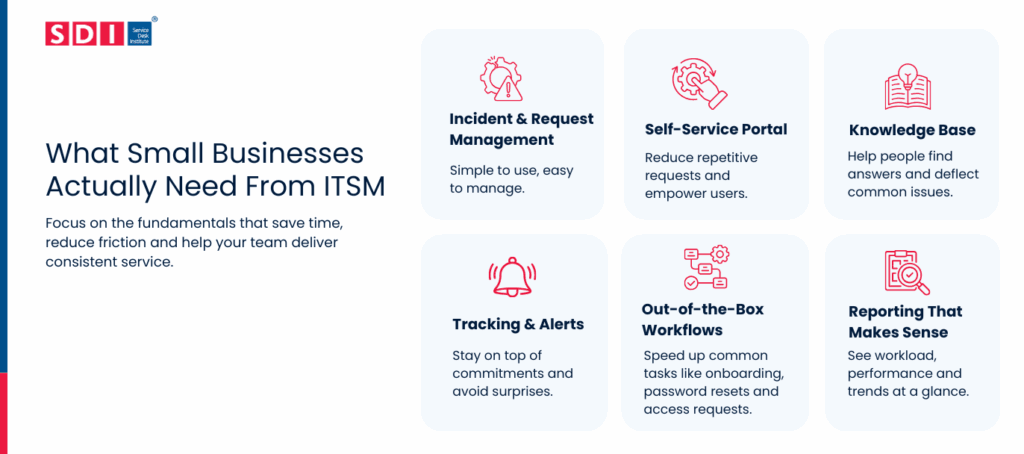
In smaller environments, ITSM success usually comes from getting the fundamentals right. Most teams need a platform that makes it easier to capture, route and resolve work without requiring a major implementation programme or specialist admin resource.
In practice, that usually means prioritising:
✅ Incident and request management that is simple to use and easy to manage.
✅ A self-service portal that reduces friction for employees.
✅ A searchable knowledge base that helps deflect common issues.
✅ Basic SLA tracking and alerts to support service consistency.
✅ Out-of-the-box workflows for common tasks such as password resets, onboarding and access requests.
✅Reporting that gives a clear view of workload, performance and recurring issues.
Many smaller teams get more value from intuitive ticket handling and self-service than they do from large sets of advanced modules that take months to configure. That is why it is so important to compare tools against real operational needs rather than future-state wish lists. SDI’s A Comprehensive Guide to ITSM Tool Selection is a useful companion resource for teams that want to structure this process more formally.
Enterprise ITSM vs SMB-Friendly Tools
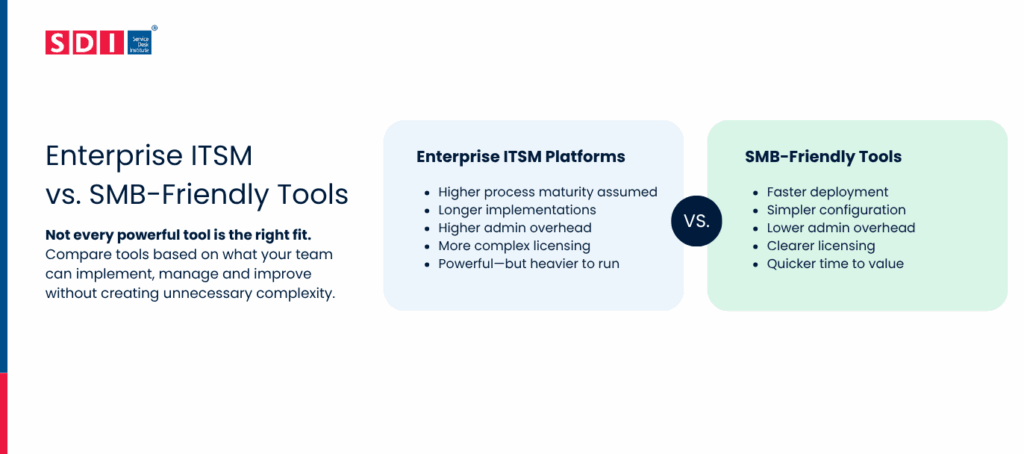
Not all ITSM tools are designed with smaller teams in mind. Some enterprise-focused platforms are extremely capable, but they also assume a higher level of process maturity, governance and in-house administration.
SMB-friendly tools, by contrast, usually focus on:
✅ Faster deployment
✅ Simpler configuration
✅ Lower admin overhead
✅ Clearer licensing
✅ Quicker time to value
But that does not mean smaller organisations should automatically avoid enterprise platforms. It means they should compare tools realistically, based on what the organisation can implement, own and improve without creating unnecessary burden. If you want a wider view of the current landscape, you can explore SDI’s ITSM Tools Buyer Guide, which brings together some guidance on choosing the right tool and some available solutions on the market.
A Practical Shortlist Framework for Smaller Teams
If you look at a good ITSM shortlist, it’s not that overcomplicated. For smaller organisations, a well-defined, simple comparison approach that emphasises fit is best.
A simple approach includes four steps.
1. Separate must-haves from nice-to-haves
First, you need to understand which skills the team actually needs over the next year. For smaller service desks, the must-haves are usually the basic ticket handling capabilities, self-service, knowledge management, SLA visibility, and usable reporting. Additional features such as wider enterprise workflows, more advanced automation, and broader asset management or more complex integrations can be nice-to-haves.
2. Ask better questions in demos
Good demos are not about seeing the longest feature list. They are about understanding how well the tool works in real situations. Useful questions include how long implementation usually takes, how much can be configured without consultancy, what admin training is provided and how easy it is to adapt the platform later.
One of the most practical ways to compare vendors is to see them in action. SDI’s ITSM Tools Demo Days and wider Events & Networking programme give service desk leaders the opportunity to explore tools in a more structured and realistic way.
3. Look out for red flags
The more obvious red flags include a strong focus on paid consultancy for your basic configuration, lack of pricing transparency for implementation, complex admin models and tools that appear to be the perfect solution for everyone except your team.
4. Evaluate fit, not just features
The most successful tool decisions are based on operational fit, user experience, ownership and long-term sustainability. That is why SDI’s ITSM Tool Selection & Assurance Services focus on more than technical capability alone.
One of The Biggest Problems Small IT Teams Face with Shortlisting Tools
The tendency to focus on the front-end without considering the practicalities of implementation and ongoing maintenance is a mistake many people make. A slick UI is helpful, but it’s not as important as poor reporting, hard-to-support workflows, or a platform that’s going to be costly to develop.
Smaller teams should pay close attention to:
- Admin simplicity.
- Onboarding and support quality.
- Reporting usability for non-specialists.
- Integration effort for common systems.
- The real cost of extending the platform over time.
How To Choose an ITSM Tool: Common Mistakes You Should Avoid is a useful next read for teams that want to avoid the most common evaluation pitfalls.
ITSM Platforms Worth Considering for Small Teams
There isn’t one ITSM platform that’s right for every small IT team. As we already mentioned, the best choice depends on different criteria defined by you and your team. It could depend on your budget, your existing technology, how your team works and where you expect it to be in the next few years.
Here are a few platforms worth exploring.
Mint Service Desk
This is one of the ITSM tools featured in the SDI Buyer’s Guide. Mint Service Desk is well suited to smaller teams that want everything in one place without making things overly complicated. It brings together incidents, service requests, knowledge management, self-service and asset management, helping teams spend less time switching between systems and more time resolving issues.
It also offers enough flexibility which means that it can grow well with your organisations and support more advanced processes.
Gartner-Recognised ITSM Platforms for Smaller Teams
TOPdesk
TOPdesk has become a popular choice with many small and mid-sized organisations, particularly across Europe. Gartner highlights its ease of use, straightforward setup and quick implementation, making it a good option for teams that want to improve service management without taking on unnecessary complexity.
It can also support teams outside IT, such as HR and Facilities. If your organisation is growing quickly, it’s worth checking that its more advanced capabilities will continue to meet your needs as requirements evolve.
Jira Service Management
If your IT team already uses Atlassian products, Jira Service Management is an obvious platform to consider. It brings service management, development and operations closer together, which can make collaboration much smoother.
Gartner does suggest looking carefully at licensing and configuration. Depending on your requirements, some AI and asset management features may increase costs. This means that smaller teams may find they need more configuration than expected.
HaloITSM
HaloITSM is designed to grow with your organisation, so it can be a good choice if you’re thinking beyond your immediate needs. Gartner also highlights its predictable pricing, with AI, automation and integrations included as part of the platform rather than sold as separate add-ons.
SysAid
SysAid focuses on keeping service management straightforward through low-code configuration and built-in AI. Gartner highlights its simple setup, bundled AI capabilities and strong customer success programme, which could be particularly valuable for smaller teams developing their ITSM processes.
Other ITSM Platforms Worth Exploring
Gartner’s Magic Quadrant and the SDI ITSM Tools Buyer’s Guide are both useful places to start your research, but they don’t include every platform on the market. There are some other ITSM platforms that could be a great fit for smaller teams.
Here are some more platforms you might want to add to your research list:
Hoth Service Desk
A great option for small teams to medium-sized enterprises and public-sector organisations across IT. Hoth is a powerful ITSM and service desk platform that streamlines incident management, ticket routing, and knowledge delivery. It offers no-code automation, intelligent self-service, and flexibility beyond the IT department to support the entire organisation’s service needs.
Alloy Navigator
Another good option for small IT teams looking to bring IT service management and asset management together in one platform. It offers core ITSM processes, automation, self-service and asset management, with options designed for teams starting with just a few technicians.
Vision Helpdesk Service Desk
This tool is designed for businesses of all sizes. But it is still a good option for small teams that want to introduce more structured ITSM processes without moving immediately to a large enterprise platform. This tool combines incident, problem and change management with asset management, CMDB, service catalogue and self-service capabilities.
Continue Your Research
If you are exploring ITSM tools for a smaller organisation, these SDI resources are useful next steps:
➡️ Read A Comprehensive Guide to ITSM Tool Selection
➡️ Join SDI’s ITSM Tools Demo Days
➡️ Learn about ITSM Tool Selection & Assurance Services